
2D Rendering
php-vio includes a built-in 2D batch renderer that handles shapes, sprites, and text. All 2D primitives are collected per frame, z-sorted, and flushed in a single optimized draw call.
How It Works
- Call
vio_rect(),vio_circle(),vio_sprite(), etc. to queue primitives - Each primitive has a
zvalue for depth sorting (default:0.0) - Call
vio_draw_2d($ctx)to flush the batch – sorts by z, batches by texture, renders
The batch starts with a capacity of 4096 items (24,576 vertices) and grows dynamically as needed – there is no hard upper limit.
Shapes
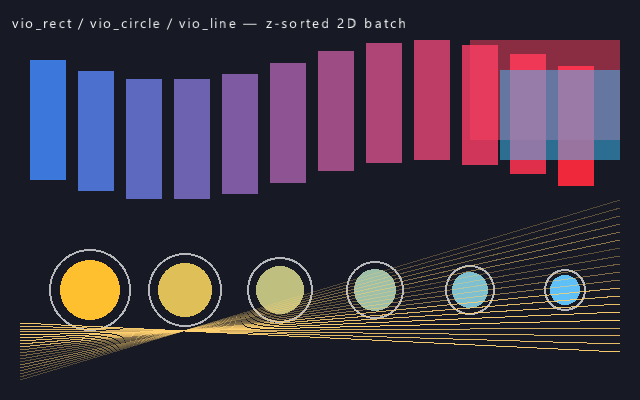
Rects, rounded rects, circles (filled and outlined) and lines – one batch, one draw call. Rendered headless by examples/gallery.php.
Rectangle
// Filled rectangle
vio_rect($ctx, 100, 100, 200, 150, [
    "color" => 0xFFFF0000,  // Red, full alpha
]);

// Outlined rectangle
vio_rect($ctx, 100, 100, 200, 150, [
    "color"   => 0xFF00FF00,
    "outline" => true,
]);
Rounded Rectangle
vio_rounded_rect($ctx, 50, 50, 300, 200, 16.0, [
    "color" => 0xFF3366FF,
]);
Circle
// Filled circle
vio_circle($ctx, 400, 300, 50, [
    "color" => 0xFFFFFF00,
]);

// Outlined circle with custom segment count
vio_circle($ctx, 400, 300, 50, [
    "color"    => 0xFFFFFF00,
    "outline"  => true,
    "segments" => 64,
]);
Line
vio_line($ctx, 0, 0, 800, 600, [
    "color" => 0xFFFFFFFF,
]);
WARNING
Line rendering may produce no visible pixels on some GPU/driver configurations due to rasterization rules. For reliable lines, consider using thin rectangles.
Sprites
Draw textured quads with position, scale, and tint:
$tex = vio_texture($ctx, ["file" => "player.png"]);

vio_sprite($ctx, $tex, [
    "x"       => 100,
    "y"       => 200,
    "width"   => 64,
    "height"  => 64,
    "scale_x" => 2.0,
    "scale_y" => 2.0,
    "color"   => 0xFFFFFFFF,  // Tint (white = no tint)
    "z"       => 1.0,         // Draw on top
]);
Text
$font = vio_font($ctx, "/path/to/font.ttf", 24.0);

vio_text($ctx, $font, "Hello, World!", 10, 40, [
    "color" => 0xFFFFFFFF,
    "z"     => 2.0,
]);

// Measure text dimensions
$size = vio_text_measure($font, "Hello, World!");
// $size = ["width" => 142.5, "height" => 24.0]
Font rendering uses stb_truetype with a 4096x4096 atlas texture that supports multi-range Unicode – including Latin, Greek, Cyrillic, CJK, Hangul, and more (33,000+ glyphs). See the Fonts API for full details.
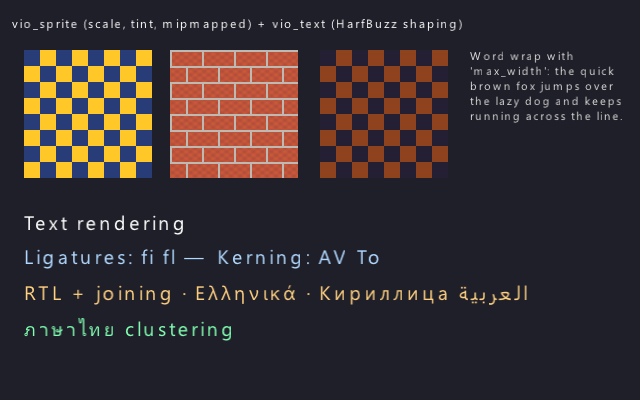
vio_sprite with tint and scale next to vio_text – HarfBuzz shaping handles Arabic (RTL, joining) and Thai (clusters); max_width wraps the paragraph on the right.
Colors
Colors are 32-bit unsigned integers in AARRGGBB format:
0xFFFF0000  // Red,   alpha=FF (the first byte)
0xFF00FF00  // Green, alpha=FF
0xFF0000FF  // Blue,  alpha=FF
0xFFFFFFFF  // White, alpha=FF
0x80FFFFFF  // White, alpha=80 (50% transparent)
The color option is an alias for fill – both work.
Z-Ordering
Every 2D primitive accepts a z option (default 0.0). Lower z-values are drawn first (behind), higher values on top.
vio_rect($ctx, 100, 100, 200, 200, ["color" => 0xFFFF0000, "z" => 0.0]);  // Behind
vio_rect($ctx, 150, 150, 200, 200, ["color" => 0xFF00FF00, "z" => 1.0]);  // In front
Transforms
Push/pop a 2x3 affine transformation matrix to affect all subsequent 2D primitives:
// Push rotation + translation
$angle = deg2rad(45);
$cos = cos($angle);
$sin = sin($angle);
vio_push_transform($ctx, $cos, $sin, -$sin, $cos, 400, 300);

vio_rect($ctx, -50, -50, 100, 100, ["color" => 0xFFFF0000]);

vio_pop_transform($ctx);
The matrix format is [a, b, c, d, e, f] representing:
| a  c  e |
| b  d  f |
| 0  0  1 |
Scissor Clipping
Restrict rendering to a rectangular region:
vio_push_scissor($ctx, 100, 100, 400, 300);

// Only pixels within (100,100)-(500,400) are drawn
vio_rect($ctx, 0, 0, 800, 600, ["color" => 0xFFFF0000]);

vio_pop_scissor($ctx);
Nested scissor rects are intersected – the visible area gets smaller with each push.
Flushing
Always call vio_draw_2d() before vio_end():
vio_begin($ctx);
vio_clear($ctx, 0.0, 0.0, 0.0, 1.0);

// Queue 2D primitives
vio_rect($ctx, ...);
vio_sprite($ctx, ...);
vio_text($ctx, ...);

// Flush the batch
vio_draw_2d($ctx);

vio_end($ctx);
Mixing 2D and 3D
You can use both 2D and 3D rendering in the same frame. Draw 3D first, then overlay 2D:
vio_begin($ctx);
vio_clear($ctx, 0.1, 0.1, 0.15, 1.0);

// 3D scene
vio_bind_pipeline($ctx, $pipeline);
vio_draw($ctx, $mesh);

// 2D overlay (UI, HUD, debug info)
vio_rect($ctx, 10, 10, 200, 40, ["color" => 0xAA000000, "z" => 0]);
vio_text($ctx, $font, "FPS: 60", 20, 35, ["color" => 0xFFFFFFFF, "z" => 1]);
vio_draw_2d($ctx);

vio_end($ctx);