
Headless & Testing
php-vio supports headless rendering – creating a GPU context without a visible window. This is essential for automated testing, CI pipelines, and server-side rendering.
Headless Mode
$ctx = vio_create("opengl", [
    "width"    => 640,
    "height"   => 480,
    "headless" => true,
]);
In headless mode, a hidden GLFW window is created. All rendering works identically – you just can't see it on screen. The framebuffer is exactly width × height pixels on every backend, independent of the host's display scaling.
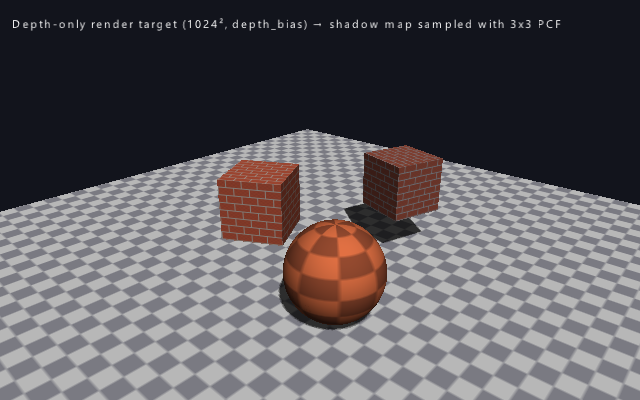
Everything in the Feature Gallery – including this shadow-mapped scene – was produced this way, by a plain php CLI run with no window:
Capturing Pixels
// Read framebuffer as raw RGBA bytes
$pixels = vio_read_pixels($ctx);
// $pixels is a binary string: width * height * 4 bytes

// Save as PNG
vio_save_screenshot($ctx, "screenshot.png");
INFO
vio_read_pixels() works on every backend (OpenGL, Vulkan, Metal, D3D11, D3D12) and returns the frame as rendered before present – strlen($pixels) === $width * $height * 4.
Visual Regression Testing (VRT)
Compare rendered output against reference images:
// Render your scene
vio_begin($ctx);
vio_clear($ctx, 0.1, 0.1, 0.15, 1.0);
vio_rect($ctx, 10, 10, 100, 50, ["color" => 0xFFFF0000]);
vio_draw_2d($ctx);
vio_end($ctx);

// Save current frame
vio_save_screenshot($ctx, "current.png");

// Compare against reference
$diff = vio_compare_images("reference.png", "current.png", [
    "threshold" => 0.01,  // 1% tolerance
]);

// Result structure
$diff = [
    "passed"      => true,     // Did it pass the threshold?
    "diff_ratio"  => 0.002,    // Ratio of different pixels
    "diff_pixels" => 15,       // Number of different pixels
    "width"       => 640,
    "height"      => 480,
    "diff_data"   => "...",    // Raw RGBA diff image
];

// Save diff visualization
if (!$diff["passed"]) {
    vio_save_diff_image($diff, "diff.png");
    echo "VRT failed! {$diff['diff_pixels']} pixels differ.\n";
}
Input Injection
Test input handling without a real keyboard/mouse:
$ctx = vio_create("opengl", [
    "width" => 64, "height" => 64, "headless" => true,
]);

// Simulate key press
vio_inject_key($ctx, VIO_KEY_W, VIO_PRESS);
vio_poll_events($ctx);
assert(vio_key_pressed($ctx, VIO_KEY_W));

// Simulate mouse
vio_inject_mouse_move($ctx, 32.0, 32.0);
vio_inject_mouse_button($ctx, VIO_MOUSE_LEFT, VIO_PRESS);
Text, scroll, touch and gamepads can be injected too – vio_inject_char(), vio_inject_scroll(), vio_touch_inject() and virtual gamepads. Whole sessions can be recorded and replayed tick by tick with input recording.
Running the Test Suite
php-vio includes 251 PHPT tests (v2.35.0):
NO_INTERACTION=1 TEST_PHP_EXECUTABLE=$(which php) \
  php run-tests.php -d extension=$PWD/modules/vio.so tests/
Tests cover:
- Extension loading and constants
- All backends (null, OpenGL, Vulkan, Metal)
- Input (keyboard, mouse, gamepad, injection)
- Shaders, pipelines, textures, buffers
- 2D rendering with pixel verification
- Audio, video recording
- Render targets, cubemaps, instancing
- Multi-context scenarios
CI Integration
For CI environments without a GPU, use the null backend:
$ctx = vio_create("null", ["width" => 64, "height" => 64]);For GPU tests in CI, ensure:
- A display server or virtual framebuffer (e.g.,
Xvfbon Linux) - GPU drivers are installed
- OpenGL/Vulkan libraries are available