
Render Targets
Render targets (framebuffer objects / FBOs) let you render to an offscreen texture instead of the screen. This is essential for post-processing, shadow maps, reflections, and minimap rendering.
Creating a Render Target
$rt = vio_render_target($ctx, [
    "width"  => 512,
    "height" => 512,
]);
For depth-only render targets (shadow maps):
$shadowMap = vio_render_target($ctx, [
    "width"      => 1024,
    "height"     => 1024,
    "depth_only" => true,
]);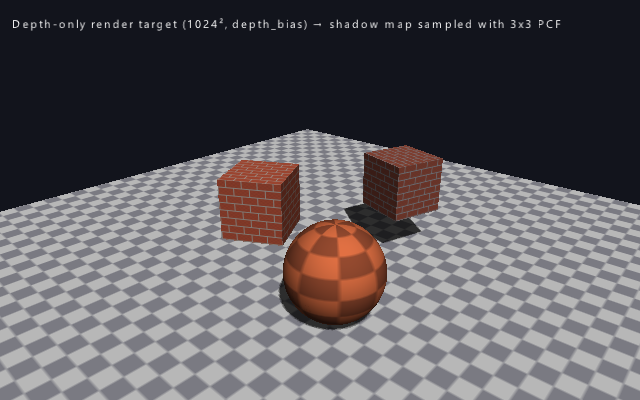
A depth-only target rendered from the light, then sampled with a comparison sampler (sampler2DShadow) and a 3×3 PCF kernel in the main pass.
Rendering to a Target
// Redirect rendering to the FBO
vio_bind_render_target($ctx, $rt);

vio_clear($ctx, 0.0, 0.0, 0.0, 1.0);
vio_bind_pipeline($ctx, $pipeline);
vio_draw($ctx, $mesh);

// Restore default framebuffer (screen)
vio_unbind_render_target($ctx);
Using the Result as a Texture
$tex = vio_render_target_texture($rt);

// Use as a regular texture in another pass
vio_bind_texture($ctx, $tex, 0);
Example: Post-Processing
// 1. Render scene to offscreen target
$rt = vio_render_target($ctx, ["width" => 800, "height" => 600]);

while (!vio_should_close($ctx)) {
    // Pass 1: Render to FBO
    vio_bind_render_target($ctx, $rt);
    vio_begin($ctx);
    vio_clear($ctx, 0.0, 0.0, 0.0, 1.0);
    vio_bind_pipeline($ctx, $scenePipeline);
    vio_draw($ctx, $sceneMesh);
    vio_end($ctx);
    vio_unbind_render_target($ctx);

    // Pass 2: Draw FBO texture to screen with post-process shader
    $fboTex = vio_render_target_texture($rt);
    vio_begin($ctx);
    vio_clear($ctx, 0.0, 0.0, 0.0, 1.0);
    vio_bind_pipeline($ctx, $postProcessPipeline);
    vio_bind_texture($ctx, $fboTex, 0);
    vio_draw($ctx, $fullscreenQuad);
    vio_end($ctx);

    vio_poll_events($ctx);
}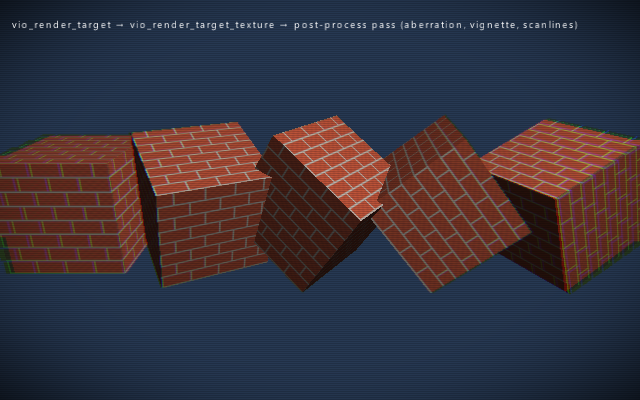
Left: the offscreen target as rendered. Right: the same texture drawn through a post-process pass (chromatic aberration + vignette + scanlines).
Multiple Render Targets
Up to four colour attachments in one pass – the classic G-buffer. Each attachment has its own format; the fragment shader writes layout(location = i) out:
$gbuffer = vio_render_target($ctx, [
    "width"       => 800,
    "height"      => 600,
    "attachments" => [VIO_FORMAT_RGBA8, VIO_FORMAT_RGBA16F, VIO_FORMAT_R16F],
]);

$albedo  = vio_render_target_texture($gbuffer, 0);
$normals = vio_render_target_texture($gbuffer, 1);
$depth   = vio_render_target_texture($gbuffer, 2);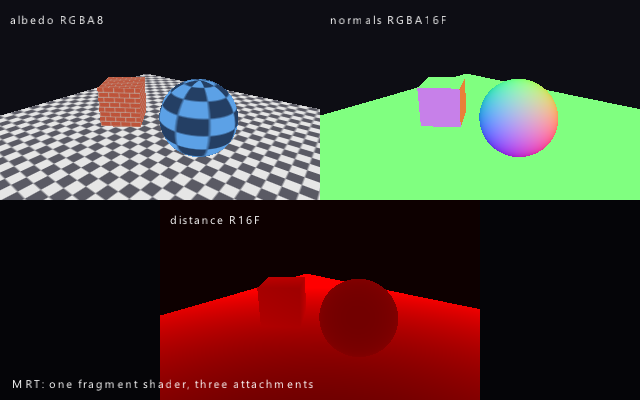
MSAA, HDR and Cube Targets
$aa  = vio_render_target($ctx, ["width" => 512, "height" => 512, "samples" => 4]);   // resolved on unbind
$hdr = vio_render_target($ctx, ["width" => 512, "height" => 512, "hdr" => true]);    // RGBA16F
$env = vio_render_target($ctx, ["cube" => true, "size" => 256, "mipmaps" => true]);

for ($face = 0; $face < 6; $face++) {
    vio_bind_render_target($ctx, $env, $face);
    // ... render the environment for this face
}
vio_unbind_render_target($ctx);
vio_generate_mipmaps($ctx, $env);
$envCube = vio_render_target_cubemap($env); // samplerCube, textureLod(dir, roughness * maxLod)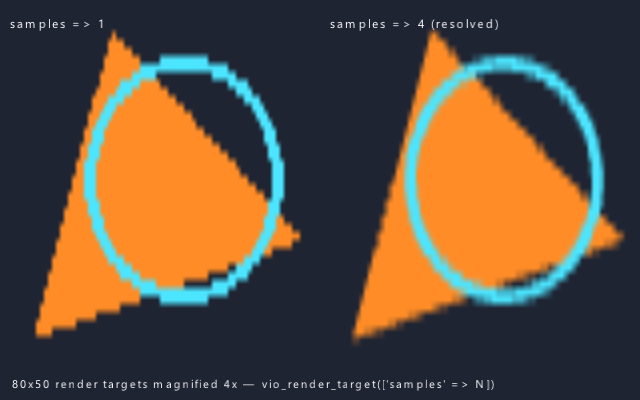 | 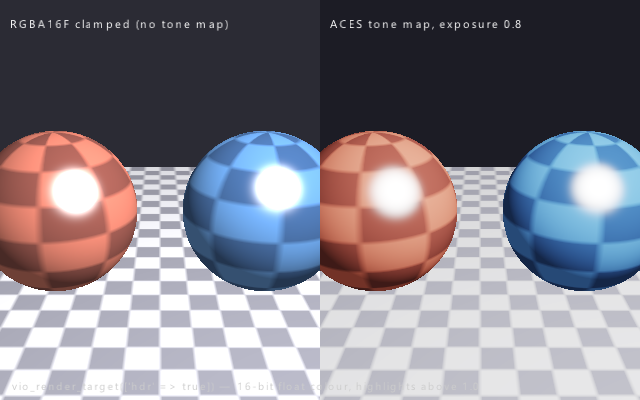 |
['samples' => 4] – aliased (left) vs. resolved (right). Available on OpenGL, D3D11 and Metal; D3D12 reports VIO_FEATURE_RENDER_TARGET_MSAA = 0. | ['hdr' => true] – values above 1.0 survive the target and are tone-mapped (ACES) in the resolve pass. |
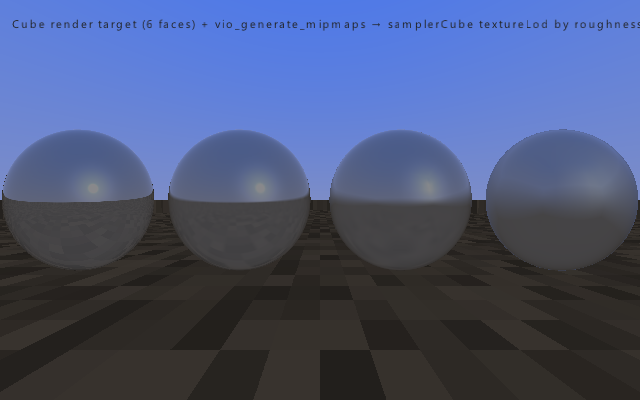 | |
['cube' => true, 'mipmaps' => true] – six faces rendered, vio_generate_mipmaps, then textureLod by roughness on the spheres. |
Query vio_supports_feature() with VIO_FEATURE_RENDER_TARGET_MSAA, _HDR, _DEPTH or _CUBE before relying on a variant. The Feature Gallery lists which backend renders which scene.