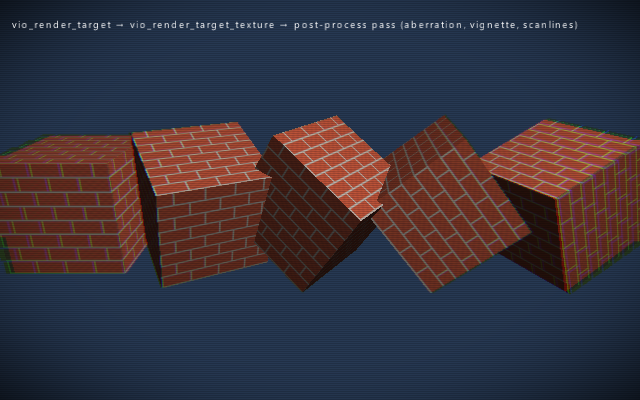
Render Targets
Functions for offscreen rendering: colour / HDR / depth-only / multisampled targets, cube targets with mip chains, multiple render targets, readback and mipmap generation.
Which backend can do what?
Gate optional variants with vio_supports_feature(): VIO_FEATURE_RENDER_TARGET (basic), _HDR, _DEPTH, _MSAA, _CUBE, VIO_FEATURE_MRT, VIO_FEATURE_MIPMAP_GEN. As of v2.10 OpenGL, D3D11, D3D12 and Metal support every variant except MSAA on D3D12; Vulkan only has basic colour targets. See the Feature Gallery for rendered examples.
vio_render_target
VioRenderTarget|false vio_render_target(VioContext $context, array $config)Create an offscreen render target. New targets start defined: colour cleared to 0, depth to 1.0.
Config:
| Key | Type | Default | Description |
|---|---|---|---|
width | int | required* | Target width in pixels |
height | int | required* | Target height in pixels |
depth_only | bool | false | Depth-only target (shadow maps); sample it with sampler2DShadow or as a grey depth texture |
hdr | bool | false | RGBA16F colour attachment instead of RGBA8 – values above 1.0 survive |
samples | int | 0 | MSAA sample count (2/4/8). Resolved to a single-sample texture on unbind / readback. Colour targets only |
cube | bool | false | Cube render target with six faces; use size instead of width/height |
size | int | – | Face size of a cube target (*required with cube) |
mipmaps | bool | false | Allocate a full mip chain so vio_generate_mipmaps() / textureLod work |
attachments | int[] | [VIO_FORMAT_RGBA8] | Multiple render targets: one VIO_FORMAT_* per colour attachment (up to VIO_MAX_COLOR_ATTACHMENTS = 8; on Vulkan more than 4 needs a device with that maxColorAttachments). Overrides hdr |
storage | bool | false | The colour attachments double as compute storage images (below). Single-sample 2D colour targets; needs VIO_FEATURE_RENDER_TARGET_STORAGE (D3D12, Vulkan) |
layers | int | – | 2–64: 2D array target (colour or depth_only, every layer with its own depth; single attachment, single-sampled, no mips). Bind one layer with vio_bind_render_target($ctx, $rt, $layer), sample the array as sampler2DArray. Needs VIO_FEATURE_RENDER_TARGET_LAYERED |
rate_map | array | – | ['x' => [q, …], 'y' => [q, …]]: sampling quality 0 < q ≤ 1 of 1–16 equal zones per axis. With VIO_FEATURE_RASTER_RATE_MAP (Metal) low-quality zones render with fewer samples into a smaller physical target that is resolved into the texture when the pass leaves the target; elsewhere full rate. Plain 2D colour targets only (ValueError otherwise) |
$scene  = vio_render_target($ctx, ["width" => 1280, "height" => 720]);
$hdr    = vio_render_target($ctx, ["width" => 1280, "height" => 720, "hdr" => true]);
$shadow = vio_render_target($ctx, ["width" => 2048, "height" => 2048, "depth_only" => true]);
$aa     = vio_render_target($ctx, ["width" => 512,  "height" => 512, "samples" => 4]);
$env    = vio_render_target($ctx, ["cube" => true, "size" => 256, "mipmaps" => true]);
$gbuf   = vio_render_target($ctx, ["width" => 1280, "height" => 720,
            "attachments" => [VIO_FORMAT_RGBA8, VIO_FORMAT_RGBA16F, VIO_FORMAT_R16F]]);
Formats: VIO_FORMAT_RGBA8, RGBA16F, RGBA32F, R11G11B10F, RG16F, R16F, R32F, R8 (see Constants → Pixel Formats). With MRT the fragment shader writes layout(location = i) out vec4 per attachment; on D3D12 pass the same attachments list to vio_pipeline() so the PSO knows the formats.
vio_render_target_size
array vio_render_target_size(VioRenderTarget $target)['width' => int, 'height' => int, 'physical_width' => int, 'physical_height' => int, 'rate_map' => bool]: the logical size and the size the GPU renders at. The physical size is smaller only with an active rate_map (Metal, VIO_FEATURE_RASTER_RATE_MAP); everywhere else it equals the logical size and rate_map is false.
$rt = vio_render_target($ctx, ['width' => 1920, 'height' => 1080,
                               'rate_map' => ['x' => [0.5, 1.0, 0.5], 'y' => [0.5, 1.0, 0.5]]]);
$s = vio_render_target_size($rt);
// Metal: physical_width / physical_height below 1920 × 1080, 'rate_map' => true
// other backends: physical size = 1920 × 1080, 'rate_map' => false
vio_create_render_target
VioRenderTarget|false vio_create_render_target(VioContext $context, int $width, int $height, array $options = [])Positional variant of vio_render_target(); $options takes the same keys.
vio_bind_render_target
void vio_bind_render_target(VioContext $context, VioRenderTarget $target, int $face = -1, int $level = 0)Redirect all rendering to the target. For cube targets pass $face (0–5 = +X, −X, +Y, −Y, +Z, −Z) and optionally the mip $level to render into. Binding outside a frame is remembered and applied by the next vio_begin().
for ($face = 0; $face < 6; $face++) {
    vio_bind_render_target($ctx, $env, $face);
    vio_clear($ctx, 0, 0, 0, 1);
    // ... render the environment as seen from this face
}
vio_unbind_render_target($ctx);
vio_unbind_render_target
void vio_unbind_render_target(VioContext $context)Restore rendering to the default framebuffer. Resolves an MSAA target into its sampleable texture.
vio_push_render_target / vio_pop_render_target
void vio_push_render_target(VioContext $context, VioRenderTarget $target)
void vio_pop_render_target(VioContext $context)
Stack variant: push binds the target and remembers the previous one, pop restores it. Use this in helper code that must not disturb the caller's current target.
vio_set_render_target
void vio_set_render_target(VioContext $context, ?VioRenderTarget $target)Bind $target, or null to return to the default framebuffer.
vio_render_target_texture
VioTexture|false vio_render_target_texture(VioRenderTarget $target, int $attachment = 0)The colour attachment ($attachment indexes the MRT list) – or the depth texture of a depth-only target – as a VioTexture for sampling in later passes. The texture is owned by the render target; keep the target alive while you use it.
VIO_RT_DEPTH selects the depth of a colour target (plain or MRT) – the scene depth a temporal resolve, motion-vector dilation or SSAO reads next to the G-buffer. It needs VIO_FEATURE_RENDER_TARGET_DEPTH_SAMPLE (OpenGL, D3D11, D3D12, Vulkan, Metal) and a single-sample 2D target (no samples, cube, layers or active rate_map; those return false). Like a shadow map it samples NEAREST with a white border and is readable once the target is unbound or another target is bound; binding the target again keeps depth-testing against it.
$gbuf  = vio_render_target($ctx, ["width" => 1280, "height" => 720,
           "attachments" => [VIO_FORMAT_RGBA16F, VIO_FORMAT_RG16F]]);   // colour + motion
$depth = vio_render_target_texture($gbuf, VIO_RT_DEPTH);               // sampler2D, .r = depth
vio_render_target_cubemap
VioCubemap|false vio_render_target_cubemap(VioRenderTarget $target)A cube target as a VioCubemap (bind with vio_bind_cubemap, sample with samplerCube / textureLod). Together with mipmaps => true and vio_generate_mipmaps() this is the standard environment-probe path: roughness selects the mip level.
vio_read_render_target
string|false vio_read_render_target(VioRenderTarget $target, int $face = -1, int $attachment = 0, ?array $options = null)Read a target back as RGBA8 bytes (width * height * 4), also mid-frame. HDR targets are converted to 8 bit, depth-only targets come back as a grey depth ramp, cube targets need $face.
With ['raw' => true] a colour attachment comes back in its own format, bit-exact and unclamped: width * height * bytes-per-texel, row 0 at the top like the RGBA8 readback.
| Format | Bytes per texel | Layout |
|---|---|---|
RGBA16F / RG16F / R16F | 8 / 4 / 2 | IEEE halves, little endian |
RGBA32F / R32F | 16 / 4 | IEEE floats, little endian |
R11G11B10F / RGB10A2 | 4 | one packed uint32, R in the low bits |
RGBA8 / R8 | 4 / 1 | bytes, RGBA8 in R, G, B, A order on every backend |
$mv = vio_read_render_target($gbuf, -1, 1, ['raw' => true]);   // RG16F motion vectors
$xy = unpack('v2', $mv);                                         // half bits of texel (0, 0)
Depth-only targets refuse raw.
vio_generate_mipmaps
bool vio_generate_mipmaps(VioContext $context, VioRenderTarget|VioTexture|VioCubemap $object)Build the mip chain of a render target created with mipmaps => true, a texture or a cubemap. Requires VIO_FEATURE_MIPMAP_GEN (OpenGL, D3D11, D3D12, Metal).
Render targets as storage images
A target created with 'storage' => true is drawn into like any other and its colour attachments can also be read and written by a compute kernel – a TAA history or an upscaler output updated in compute and then sampled or drawn into again. Bind an attachment with vio_compute_bind_image() and declare it in GLSL with the attachment's own format qualifier:
$hist = vio_render_target($ctx, ["width" => $w, "height" => $h,
          "attachments" => [VIO_FORMAT_RGBA16F], "storage" => true]);
vio_compute_bind_image($ctx, $resolve, vio_render_target_texture($hist, 0), 0, VIO_COMPUTE_WRITE);
vio_compute_dispatch($ctx, $resolve, $w / 8, $h / 8, 1, ['async' => true]); // inside the framelayout(binding = 0, rgba16f) uniform image2D u_history;Inside vio_begin() / vio_end() dispatch with ['async' => true] so the kernel runs in order with the draws around it; outside a frame a plain (synchronous) dispatch works. Single-sample 2D colour targets only. VIO_FEATURE_RENDER_TARGET_STORAGE is set on D3D12 (ALLOW_UNORDERED_ACCESS, typed UAV in the attachment's format) and Vulkan (STORAGE usage, the images rest in GENERAL; RGBA8 attachments are stored as R8G8B8A8 there, and the 2D batch does not draw into such targets). OpenGL, D3D11 and Metal refuse the option.
vio_destroy_render_target
void vio_destroy_render_target(VioRenderTarget $target)Release the GPU resources early (they are also released when the object is garbage-collected).
Orientation
Row 0 of a render target is the bottom row on OpenGL and the top row on D3D11, D3D12 and Metal. Shaders that sample a target with GL-style UVs must flip V on the D3D/Metal backends ($flip = vio_backend_name($ctx) !== 'opengl'); vio_read_pixels() and vio_read_render_target() always return row 0 at the top. examples/gallery.php in the repository shows the pattern (rt_quad()).
Example
$rt = vio_render_target($ctx, ["width" => 512, "height" => 512]);

// Pass 1: render the scene into the target
vio_begin($ctx);
vio_bind_render_target($ctx, $rt);
vio_clear($ctx, 0.0, 0.0, 0.0, 1.0);
vio_bind_pipeline($ctx, $scenePipeline);
vio_draw($ctx, $sceneMesh);
vio_unbind_render_target($ctx);

// Pass 2: post-process it onto the screen
vio_bind_pipeline($ctx, $postPipeline);
vio_bind_texture($ctx, vio_render_target_texture($rt), 0);
vio_draw($ctx, $fullscreenQuad);
vio_end($ctx);